TYPES OF HISTOGRAMS, SPSS, AND PYTHON
September 28, 2025
Once the observations are put into the bins, typically of equal width, the histogram shows the shape of the distribution of frequencies. Generally, there are no gaps in-between the bars in a histogram. A histogram and a bar graph are not similar. A histogram’s bar width has a distinct meaning. The Frequency histogram and the density histogram are the most commonly used types of histograms.
Frequency histogram
The height of a bar shows the frequency, which is the number of observations (values) in the bin. The bar width is the size of the bin (or interval).
The above histogram has 4 bins (0-25, 25-50, 50-75, and 75-100). The first bin (Bin1: 0-25) has a frequency of 1, which means Bin1 has only one observation (value).
The bin width can change the shape of a histogram. That means the same observations can be represented in different ways, by altering the bin size. However, one shape may better represent the center and spread than another.
The following values are the marks (Subject A) obtained by 23 students:
28, 29, 31, 33, 35, 37, 40, 43, 47, 50, 53, 60, 61, 64, 70, 70, 71, 73, 79, 80, 80, 81, 82
Let's put the observations (example 8) into the bins of size 8.
| Marks, Xi | Frequency |
|---|---|
| 28 ≤ Xi ˂ 36 | 5 |
| 36 ≤ Xi ˂ 44 | 3 |
| 44 ≤ Xi ˂ 52 | 2 |
| 52 ≤ Xi ˂ 60 | 1 |
| 60 ≤ Xi ˂ 68 | 3 |
| 68 ≤ Xi ˂ 76 | 4 |
| 76 ≤ Xi ˂ 84 | 4 |
| 84 ≤ Xi ˂ 92 | 4 |
| 92 ≤ Xi ˂ 100 | 1 |
SPSS Explore procedure summarized the values of "Subject (A) - Marks" (variable label). The following statistics appeared in the SPSS output viewer.
| Statistic | ||
|---|---|---|
| Subject (A) - Marks | Mean | 56.391304 |
| Median | 60.000000 | |
| Std. Deviation | 19.080545 | |
| Minimum | 28.000000 | |
| Maximum | 82.000000 | |
| Range | 54.000000 | |
| Skewness | -0.105513 |
Histogram (1)
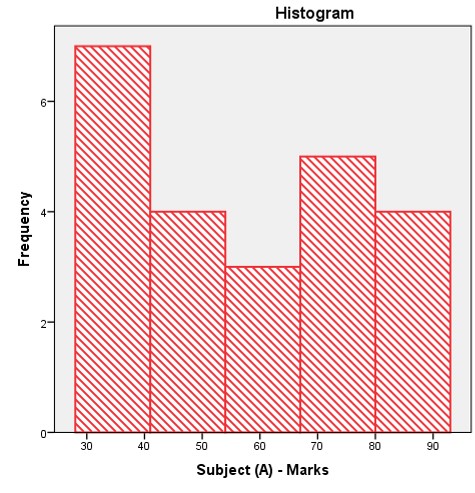
Histogram (2)
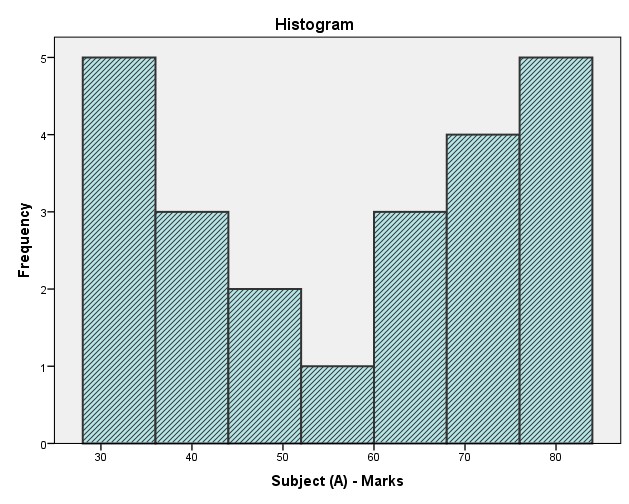
Let’s compare two histograms
The following values are the marks (Subject B) of the same 23 students:
30, 34, 35, 37, 38, 39, 41, 43, 46, 48, 52, 53, 55, 59, 62, 64, 65, 73, 75, 78, 85, 89, 96
The following statistics and the histogram (3) are the results of the example (9) produced by the SPSS Explore procedure. They appeared in the SPSS output viewer.
| Statistic | ||
|---|---|---|
| Subject (B) - Marks | Mean | 56.391304 |
| Median | 53.000000 | |
| Std. Deviation | 19.080545 | |
| Minimum | 30.000000 | |
| Maximum | 96.000000 | |
| Range | 66.000000 | |
| Skewness | 0.548684 |
Here, also note that the statistics—mean and standard deviation, of subject A are equal to the statistics of subject B.
| Subject (A) - Marks | Subject (B) - Marks |
|---|---|
| Mean = 56.39 | Mean = 56.39 |
| Std. Dev. = 19.08 | Std. Dev. = 19.08 |
Histogram (3)
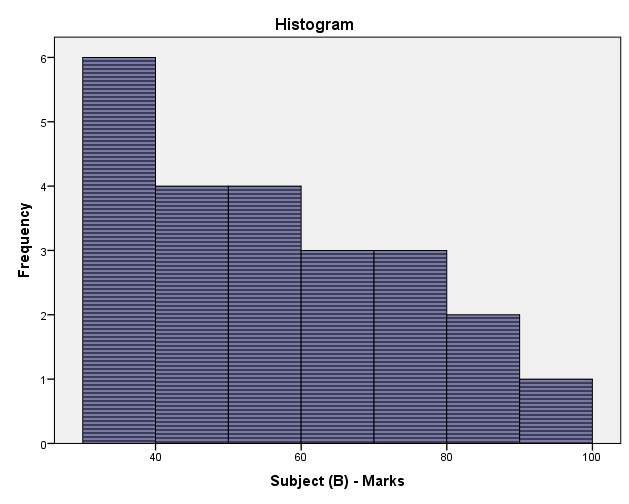
Density histograms for comparing distributions
Density histograms make use of bar areas to show percentages. The width of each bar and the height indicate the percentage (instead of the number of observations) of the observations in each bin. The height is the frequency density. The total area of all the rectangles is equal to 1.
Histograms (4)
The following image, which was created with Python, shows two density histograms: (i). Subject A histogram: Bimodal histogram (blue) and (ii). Subject B histogram: Bimodal right-skewed distribution (positively-skewed). The histogram (i) is on top of the histogram (ii), sharing the same bins of size 11. Even though some statistics of both examples are equal, their shapes are not similar.
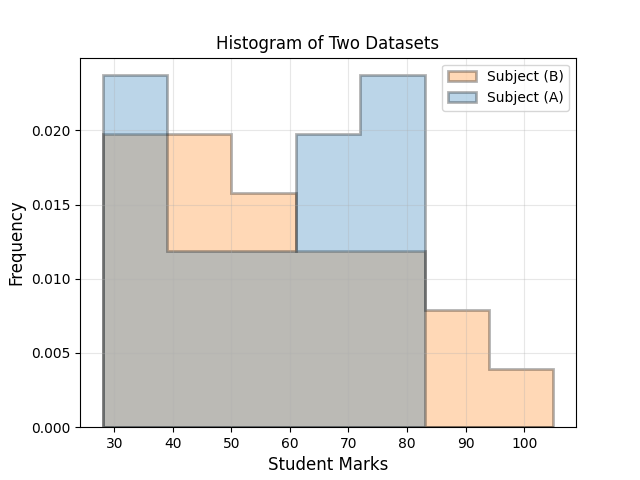
The "61 - 72" bin (blue bar) shows the percentage of the students who scored between 61 and 72 (Subject B).
The height = 0.020 (approx.) The bin width = 11
The dark area is common to the subject A and subject B marks. More students have obtained 60 or above marks for the subject A. The number of students with 40-60 marks is more for the subject B.

Home | Contact: info@gazersdigest.com
©2020-2026 Gazer’s Digest is an information-sharing platform using reliable sources to support the human-written articles. Gazer’s Digest includes topics, thought to be useful for the readers, and the contents may be related to investments. Gazer’s Digest is also a digital learning tool that helps you understand complex concepts, stay updated on trends, and sustainable solutions.