DRAW A SIMPLE SCATTERPLOT AND THE REGRESSION LINE IN SPSS.
January 24, 2026
A Scatterplot gives an easy way to identify the relationship between two variables.
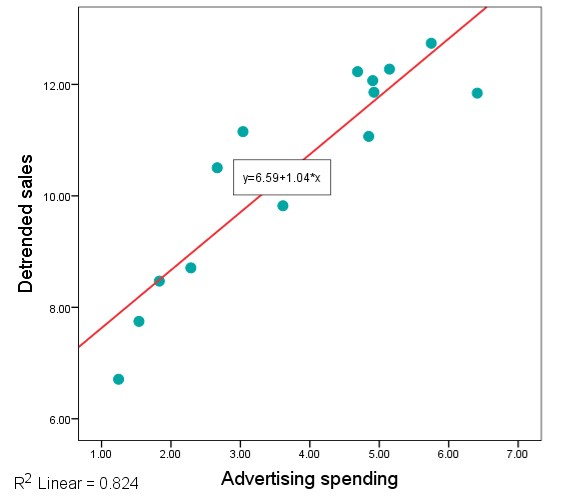
Scatterplots represent quantitative data. We name one variable “independent variable” and the other variable “dependent variable”. Typically, we put the independent variable on the X axis and the dependent variable on the Y axis.
The independent variable changes the dependent variable. The independent variable may be directly or inversely related to the dependent variable. Researchers alter some independent variables to see how they affect the dependent variable.
- Direct: Independent ↑ = Dependent ↑
- Inverse: Independent ↑ = Dependent ↓
| Independent | Dependent | Relationship |
|---|---|---|
| Consumer income | Product demand | Direct |
| Product price | Product demand | Inverse |
| Household members | Expenses | Direct |
A retailer is interested in examining the relationship between advertising costs and the resulting sales. Find out whether there is a linear relationship between the variables. Use the hypothetical data given in the table and create a simple scatterplot with a line of best fit (regression line).
| Case | Advertising Costs | Detrended Sales |
|---|---|---|
| 1 | 4.69 | 12.23 |
| 2 | 6.41 | 11.84 |
| 3 | 1.54 | 7.75 |
| 4 | 2.67 | 10.50 |
| 5 | 1.24 | 6.71 |
| 6 | 1.83 | 8.47 |
| 7 | 5.15 | 12.27 |
| 8 | 3.04 | 11.15 |
| 9 | 4.92 | 11.86 |
| 10 | 4.85 | 11.07 |
| 11 | 2.29 | 8.71 |
| 12 | 4.90 | 12.07 |
| 13 | 5.75 | 12.74 |
| 14 | 3.61 | 9.82 |
Inflation, technology, population growth, and other trends influence sales. When the trend remains, it is difficult to analyze seasonal or other short-term patterns. However, it is easier to detect and analyze the short-term patterns in the detrended data. Detrending removes the trend from the sales data, causing the short-term variability to remain in the data.
Create the variables (AdCosts and Sales) directly in the variable view, and input the sample data into the data view.
| Name | Type | Values | Missing | Measure | |
|---|---|---|---|---|---|
| 1 | AdCosts | Numeric | None | None | Scale |
| 2 | Sales | Numeric | None | None | Scale |
In this example, “Detrended Sales” is the dependent variable, and the variable “Advertising Costs” is independent.
- Graphs → Scatter/Dot… or Graphs → Legacy Dialogs → Scatter/Dot…
- Click on the Simple Scatterplot icon → Define
- Move "AdCosts" to the Y Axis, and "Sales" to the X Axis
- OK
The scatterplot will be created…
- Open the “Chart Editor” Window: Double-click on the scatterplot you have created or Right-click on the scatterplot → "Edit Content" → "In Separate Window"
The “Chart Editor” Window will be opened…
- Elements → "Add Fit Line at Total" or Right-click on the scatterplot → "Add Fit Line at Total"
- Close the dialog and the Chart Editor
The scatterplot will show the fit line. The linear regression equation:

Home | Contact: info@gazersdigest.com
©2020-2026 Gazer’s Digest is an information-sharing platform using reliable sources to support the human-written articles. Gazer’s Digest includes topics, thought to be useful for the readers, and the contents may be related to investments. Gazer’s Digest is also a digital learning tool that helps you understand complex concepts, stay updated on trends, and sustainable solutions.