DEFINE VARIABLES WITH SPSS DATA VIEW AND AUTO RECODE.
December 28, 2025
The information in the Data Editor is made up of variables and cases of the active data file. The Data Editor and Automatic Recode provide a convenient method of creating and editing data and variables.
The Data Editor window opens automatically when you start SPSS. The Data Editor has two views of your data. In both views, you can add, change, and delete information.
- The Data View displays the information, including the actual values or “value labels” of the variables.
- The Variable View shows the variable definition information, including the name, “data type” (Type): string or numeric, “value labels” (Values), “measurement level” (Measure): nominal, ordinal, or scale, and “missing values” (Missing).
Construct a frequency table to summarize the data in the SPSS Data Editor (Data View): variables and cases of an active data file are given below.
| SNo | Gender | Marks | |
|---|---|---|---|
| 1 | B0001 | Male | 60 |
| 2 | A0032 | Female | |
| 3 | A0019 | Male | 61 |
| 4 | B0200 | 68 | |
| 5 | A0135 | Male | 74 |
The variable view displays properties of all the variables of the above data file (once it is loaded into the data view). Even though there are missing values, initially, “value labels” and “missing values” contain “None”. However, unlike string variables, empty fields in numeric variables are designated as system-missing.
| Name | Type | Values | Missing | Measure | |
|---|---|---|---|---|---|
| 1 | SNo | String | None | None | Nominal |
| 2 | Gender | String | None | None | Nominal |
| 3 | Marks | Numeric | None | None | Scale |
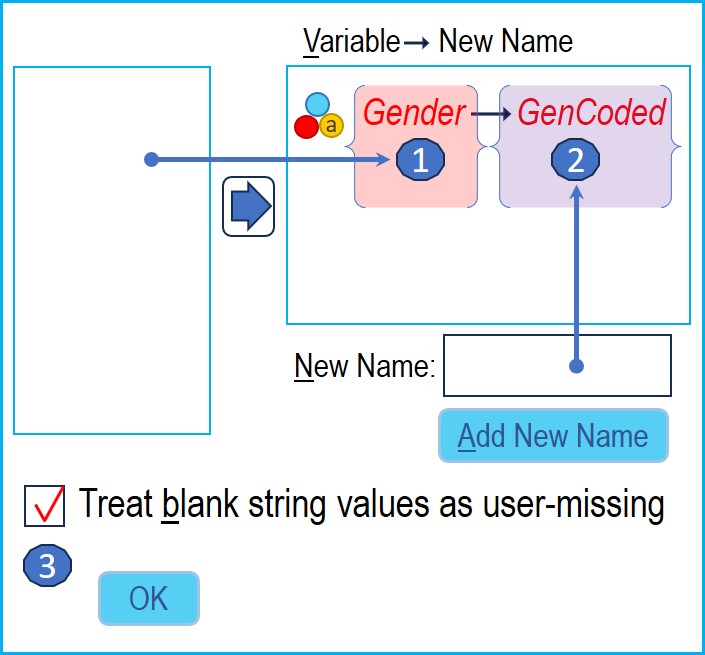
You can input “value labels” and “missing values” directly into the variable view, or you can ask Transform → Automatic Recode to fill them.
STEPS: Transform → Automatic Recode
- Select variable: Gender
- Add new name: GenCoded
- Select Treat blank string values as user-missing
Gender properties updated by Automatic Recode
| Name | Type | Values | Missing | Measure | |
|---|---|---|---|---|---|
| 1 | SNo | String | None | None | Nominal |
| 2 | Gender | String | None | None | Nominal |
| 3 | Marks | Numeric | None | None | Scale |
| 4 | GenCoded | Numeric | {1, Female}... | 3 | Nominal |
Construct the frequency table.
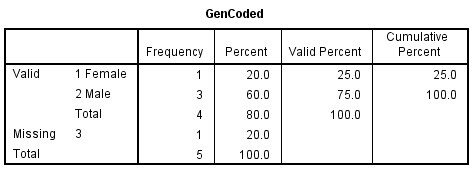
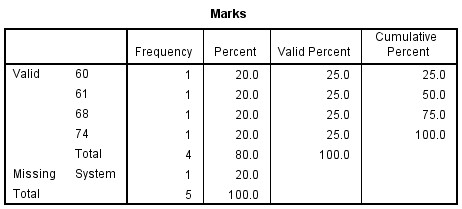
STEPS: Analyze → Descriptive Statistics → Frequencies
- Variables: GenCoded and Marks
- Select Display Frequency tables
- The Output viewer shows the frequency tables

Home | Contact: info@gazersdigest.com
©2020-2026 Gazer’s Digest is an information-sharing platform using reliable sources to support the human-written articles. Gazer’s Digest includes topics, thought to be useful for the readers, and the contents may be related to investments. Gazer’s Digest is also a digital learning tool that helps you understand complex concepts, stay updated on trends, and sustainable solutions.